 Looper
In development. I built it to run my own loops.
See which of your AI agent loops are getting better
Looper keeps each recurring agent job in one Markdown spec. Every run gets a score. The loop logs what raised the score and edits its own instructions, inside limits you write down.
Every loop on one screen
The bank lists your loops. Each row shows when the loop runs, its last score and the change since the run before. The rows below are example data.
| Loop | Schedule | Last score | Change | Spec | State |
|---|---|---|---|---|---|
| Weekly site audit | Weekly, Mon | 82 | Up 3 | v14 | Active |
| Daily news digest | Daily 7 AM | 76 | Up 5 | v6 | Active |
| Inbox triage | Every 2 hours | 90 | No change | v9 | Active |
| Docs link check | Weekly, Fri | 64 | Down 2 | v3 | Paused |
Each loop is one Markdown file
The spec says what the loop is for, how each run is scored and what the loop may change on its own. Open it in any text editor.
---
name: Weekly site audit
status: active
schedule: weekly, Monday 9 AM PT
---

## Objective1
Find broken links and missing alt text.

## Evals2
Score 0 to 100: issues found that a person
confirms, minus false alarms.

## Sources and instructions3
Crawl the sitemap. Check each page.

## Quality control4
Check findings against current WCAG
guidance before reporting them.

## Macros and recursion5
For each page: crawl, check, report.

## Learning6
Log which checks caught real issues.

## Schedule7
Mondays. Stop if the site is down.

## Roadmap8
Next: check page load time.

## OKRs9
Score 85 or more for 4 weeks in a row.Objective
One goal in one line. If it needs a paragraph, split the loop.
Evals
How each run is scored, as a number you can chart.
Sources and instructions
What the loop reads and the steps it follows.
Quality control
Checks against outside standards, such as current accessibility guidance.
Macros and recursion
Steps the loop repeats, and other loops it can call.
Learning
Notes on what raised or lowered the score. The next run reads them first.
Schedule
When it runs, and when it stops early.
Roadmap
What the loop works on next.
OKRs
The targets the scores roll up to.
Every field and rule is in the spec format docs.
What happens on each run
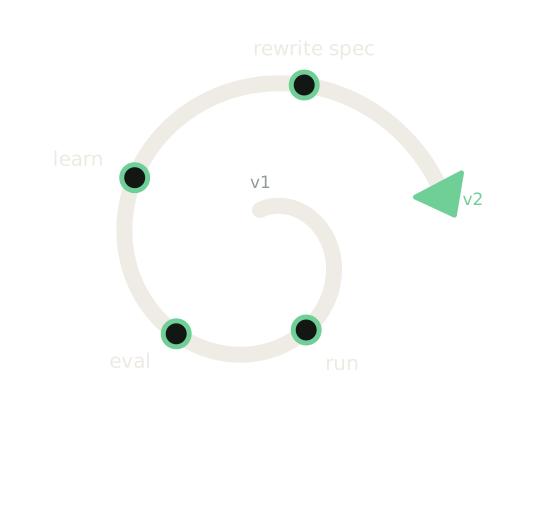
Each run has four steps. The loop can only edit the sections its spec lets it edit.
- Step 1
Run
The loop does its job on schedule, following its spec.
- Step 2
Eval
It scores the result against the evals in the spec.
- Step 3
Learn
It notes what raised or lowered the score.
- Step 4
Rewrite the spec
It updates its instructions and bumps the spec version.
Every edit is logged with the reason. If the next score drops, the loop goes back to the last version.
Who it is for
You run several recurring AI agent jobs and want to know whether each one is working.
A good fit if you
- Run nightly or weekly agent jobs on code, docs or reports.
- Want each job's instructions in a file you can read and edit.
- Want a score for every run, so you can tell if a change helped.
Not a fit if you
- Need a hosted product you can sign up for. There isn't one yet.
- Want a drag and drop workflow builder.
- Run one or two jobs. A cron job is enough for that.
Why I built it
I run recurring agent jobs every day on my own sites and projects. Each job kept its instructions in a different place. When a run taught me something, the lesson stayed in a chat log and the next run never saw it.
So I started writing each job as a spec with a score and a log. Looper holds those specs, runs them and shows me the scores.
I write the specs and decide what ships. AI agents write much of the code and the first drafts, and I review them.
Questions
- Can I use Looper today?
- No. It runs only my own loops for now. There is no sign-up.
- What does it cost?
- Nothing. It is not for sale.
- Can I use the spec format without Looper?
- Yes. A spec is a Markdown file. The format is documented, so you can write your own.
- Will a loop change things without asking?
- Only the sections its spec allows. Changes to money, logins, data or design wait for the owner.
Write your first loop spec
The spec page has the file skeleton, every field and a full example. Copy it and fill in one job you already run.